|

Pay For Police Clearance Using GCash Online

The PNP only allows online payment for Police clearance online appointment, and over-the-counter payment is not allowed. Online payment via GCash is one of the best payment options. To pay for police clearance via GCash, book an appointment, choose GCash as a payment option, enter your details, and submit them. You will get a payment receipt on successful payment. Below, I have provided a detailed payment tutorial in an easy way.

Philippine National Police

Clearance Payment Method Selector

Select your payment method for the step-by-step guide
When I paid for my own Police Clearance appointment through GCash, the entire payment process took less than three minutes. The payment was confirmed immediately, and the receipt appeared instantly in my GCash app.

Banner showing police clearance payment via GCash with phone showing GCash logo, PNP emblem, and blurred Philippine police building background.

How To Pay For Police Clearance via GCash?

Here is the step-by-step guide to pay for an online appointment using GCash. The payment method is the same for every type of clearance.

  1. First of all, visit the PNP official website and log in to your account.
  2. Now, click on the “Clearance application” option.
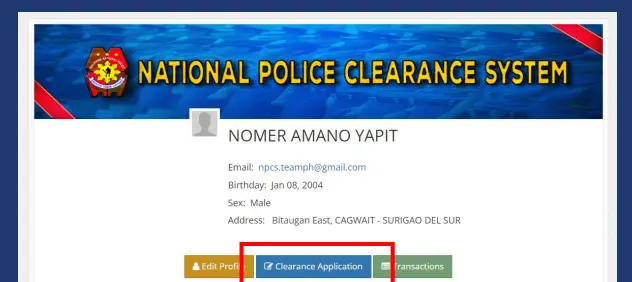
Screenshot of National Police Clearance System profile page with highlighted Clearance Application button for how to pay for police clearance via GCash.
  1. You will get the details about the appointment you booked. Double-check the details and click the “Next” for further processing.
  2. Now you will get an option for payment. 
  3. Click on the “Pay via Land Bank” and then scroll down and click next. 
  4. Scroll to the bottom of the page and click on the “save appointment” button. 
  5. You will get your appointment details and reference number. Click on the “More payment option” button given on the left side.
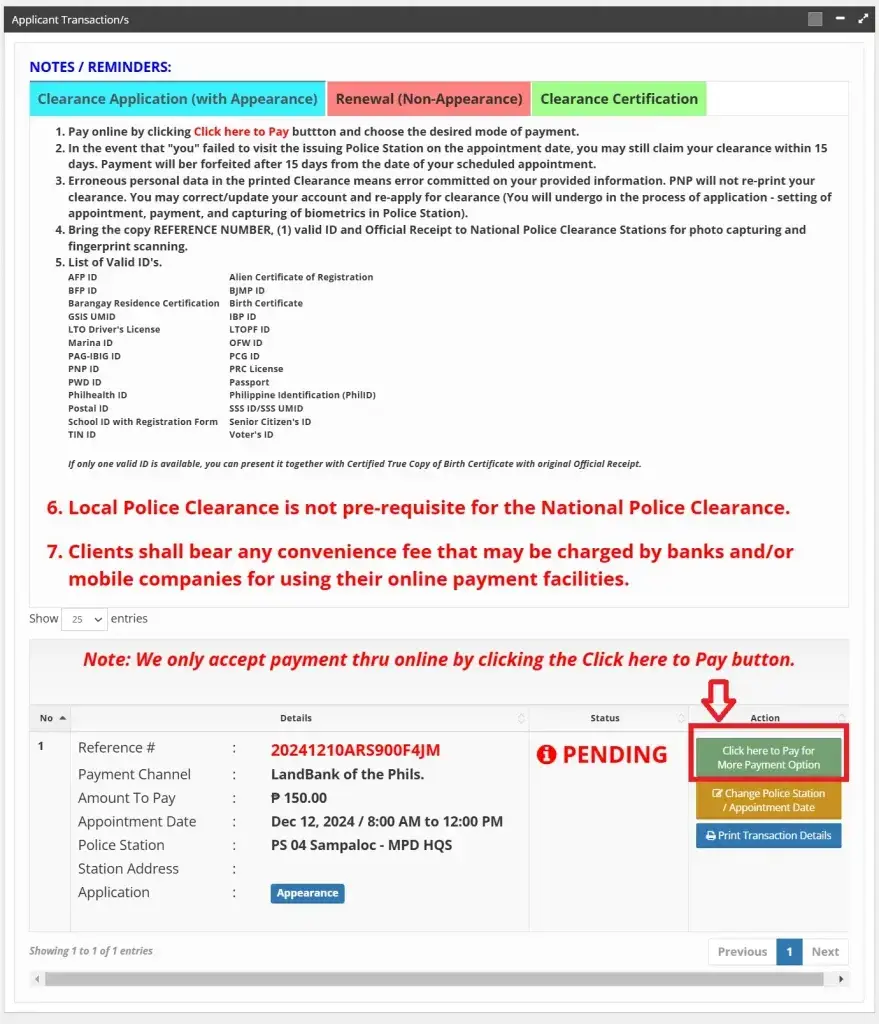
Screenshot of police clearance online payment page with transaction details, payment instructions, and highlighted Click here to Pay button.
  1. Scroll down and select GCash from the payment options.
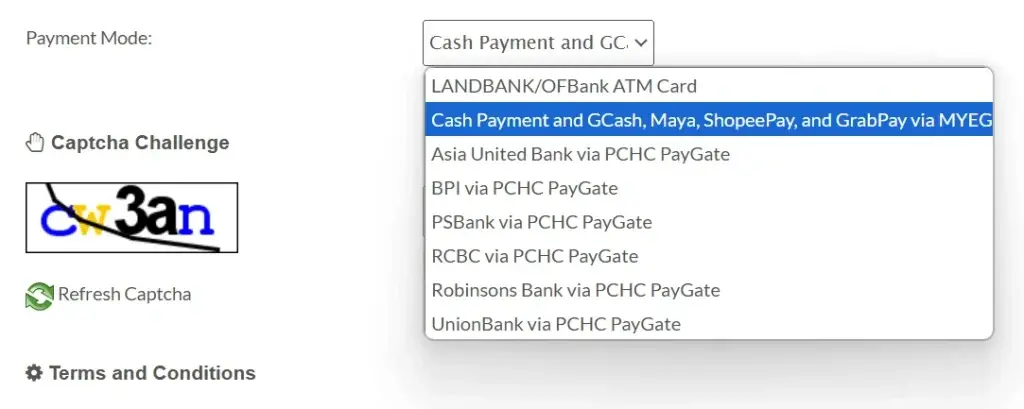
Screenshot of police clearance online payment page with captcha and dropdown menu showing GCash option, scroll down and select GCash to pay.
  1. Solve the captcha, agree to the terms and conditions, and click next.
  2. Select GCash from the available options and then fill in the payment details carefully. Once done, click on the proceed button for further processing. 
  3. Click on open GCash and then the pay option given at the bottom of the page.
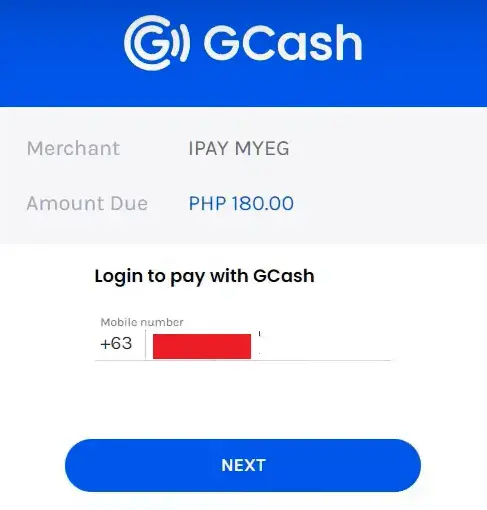
Screenshot of GCash payment page for police clearance showing merchant IPAY MYEG, amount PHP 180.00, and login with mobile number.
  1. Finally, click on the proceed button, and you are done. You will get a payment receipt as proof of payment. If you want another payment option, check our guide on police clearance payment through LandBank.

Note: Take a screenshot of your payment receipt as proof. You will be asked to provide a receipt on the appointment day. You can follow the above payment method for both Police clearance renewal and online appointment.

Benefits Of Payment Via GCash

GCash is one of the most popular and best methods for online payment of clearance fees. Here are the top five  benefits of paying the fee using GCash:

  • Convenience: GCash allows you to pay anytime and anywhere online. All you need is internet access and your GCash app.
  • Quick Processing: Payments are processed instantly. There is no need to worry about late payment. 
  • Secure Transactions: GCash uses encryption and security measures to protect your payment information. This feature also reduces the risk of fraud.
  • Hassle-Free: The app guides the user through payment with clear details and confirmations, reducing the chances of errors.
  • Proof of Payment: Upon successful payment, the app provides an immediate electronic receipt, giving you proof of payment right away.

Also check: PNP Clearance Dress code for successful photo capture and appointment booking.

Other Options For Payment 

Not only GCash, but the PNP also offers various other payment methods for online payment. Here is the complete list of payment methods:

  1. 7-Eleven
  2. Land Bank of the Philippines (LBP) ePayment Portal
  3. PayMaya
  4. Dragonpay
  5. Bayad Center Outlets
  6. Bayad Center Mobile App
  7. Bank Over the Counter (BDO, BPI, PNB, Chinabank, Metrobank, Security Bank, Union Bank)
  8. Online Bank Payments
  9. ECPay

Each payment method provides a reference or confirmation receipt required for your police clearance appointment.
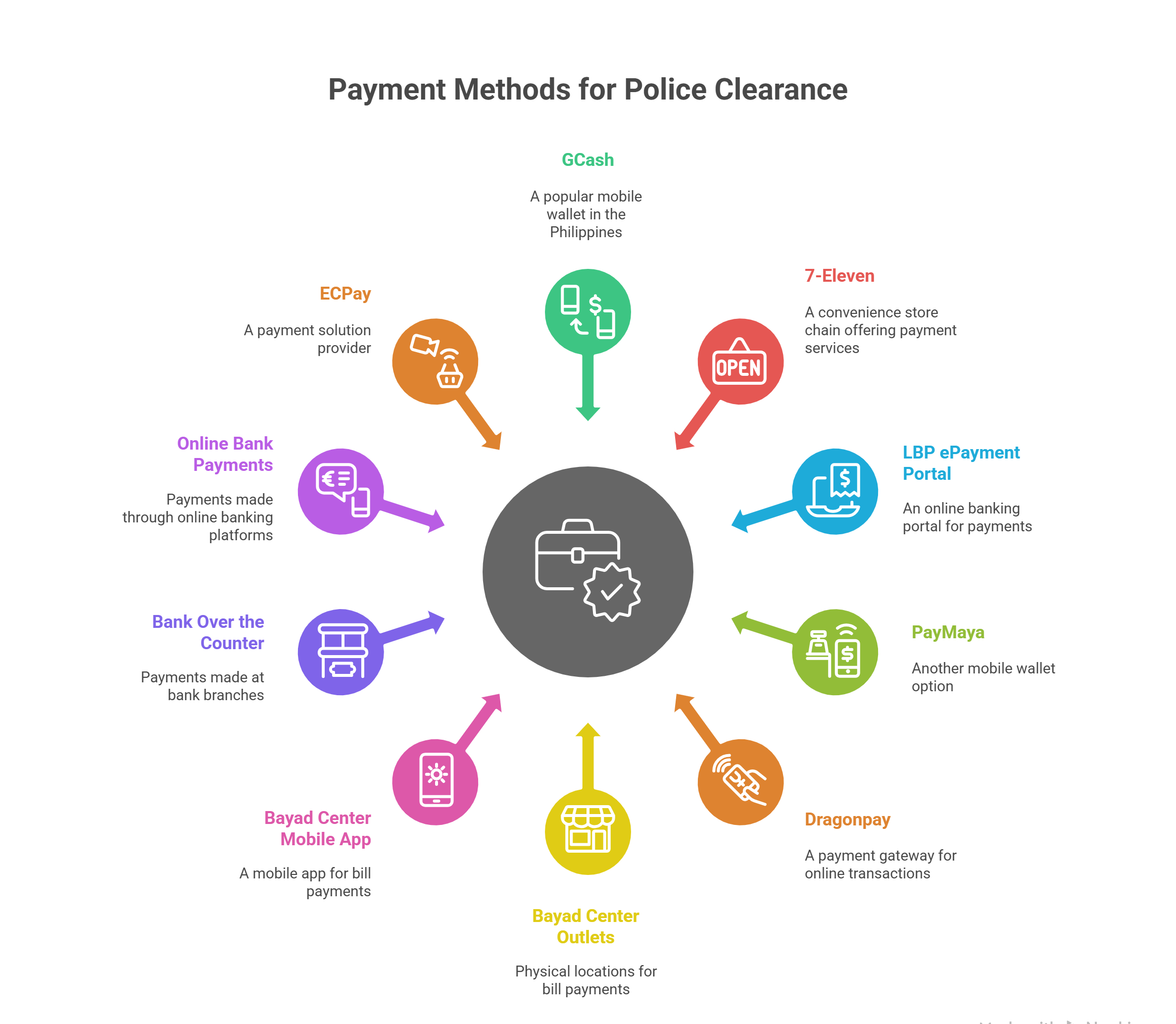
Infographic showing payment methods for Philippine police clearance, including GCash, 7-Eleven, PayMaya, Bayad Center, banks, and other e-payment options.

FAQs

To pay the clearance via GCash, visit the PNP website, log in, choose your appointment, select the payment option, choose GCash, complete payment details, and confirm. You will receive a payment receipt as proof.

Yes, you need to bring a screenshot or electronic copy of your payment receipt as proof when you visit the police station for your appointment.

Yes, other options include 7-Eleven, Land Bank ePayment Portal, PayMaya, Dragonpay, Bayad Center outlets, bank over-the-counter payments, and online bank payments.

GCash offers convenience, quick processing, security through encryption, hassle-free payment guidance, and immediate electronic proof of payment.

If your payment does not reflect within 30 minutes, first check your GCash transaction history. If the amount was deducted but your appointment still appears unpaid, contact PNP support or visit your nearest police station before your appointment date for assistance.

Conclusion

Paying for police clearance via GCash is easy and secure. Simply book your appointment on the PNP website, select GCash as your payment option, and follow the steps to complete payment. This method keeps transactions safe and hassle-free, helping you focus on meeting other requirements smoothly.
Similar Posts

Leave a Reply

Your email address will not be published. Required fields are marked *